
For the places you’ve been
Your photos already know where you’ve been.
Crestora finds the cities in your iPhone photo library and turns them into trips. See every place on one globe, then pick your best trip ever, two at a time.
Free on iPhone.

See it in 27 seconds
Every city, lit up.
A camera roll is a travel diary you never had to write. Crestora reads the map inside it.
- Found in your photos. The cities you’ve visited, suggested for you to review.
- One globe. Every place you’ve been, glowing in one view.
- Your top ten trips. The one you still talk about, right at the top.
Film credits
Music: ‘Born Of The Sky’ by Scott Buckley, CC BY 4.0. Example collection; screens rebuilt from the current app.
- Gyeongbokgung Palace: 경복궁 경회루 2011년 11월 대한민국 서울특별시 명소 (Seoul best attractions) 11.jpg by 서울특별시 소방재난본부(Seoul Metropolitan Fire & Disaster Headquarters), CC BY-SA 4.0; cropped.
- Gwangjang Market: Korea-Seoul-Gwangjang Market-01.jpg by ayustety, CC BY-SA 2.0; cropped.
- Bukchon Hanok Village: 2018 Bukchon Hanok village.jpg by Trainholic, CC BY-SA 3.0; cropped.
- Myeongdong Kyoja: Kalguksu 20230430 002.jpg by Mobius6, CC BY-SA 4.0; cropped.
- Seoul Station: Seoul Station 20150216 03 (16545535302).jpg by Republic of Korea from Seoul, Republic of Korea, CC BY-SA 2.0; cropped.
- Gyeongbokgung Palace: Hyangwonjeong 1.jpg by Kim Dae Jeung, CC0; cropped.
- Leeum Museum of Art: Museums of Seoul - SeoulMuseums2380.jpg by lumoplank, CC0; cropped.
- Tosokchon Samgyetang: Samgye-tang (32014619515).jpg by bryan... from Taipei, Taiwan, CC BY-SA 2.0; cropped.
- Bukchon Hanok Village: Bukchon-ro 11-gil street with hanok houses at blue hour in Bukchon Hanok Village Seoul.jpg by Basile Morin, CC BY-SA 4.0; cropped.
- Changdeokgung: Changdeokgung, Seoul - Changdeokgung3136.jpg by lumoplank, CC0; cropped.
- National Museum of Korea: Building by the Lake outside the National Museum of Korea in Seoul.jpg by Ethan Doyle White, CC BY-SA 4.0; cropped.
- Gwangjang Market: Dongdaemun Shopping Complex, Seoul 4.jpg by kallerna, CC BY-SA 4.0; cropped.
- tong tong petit hotel: Ikseon-dong 익선동 October 1 2020 3.jpg by S h y numis, CC BY-SA 4.0; cropped.
- Kyobo Book Centre Gwanghwamun: Kyobo bookstore, Seoul.jpg by Teemeah, CC BY-SA 4.0; cropped.
- Lisbon: No 28 Tram (45684287331).jpg by Neil, CC BY 2.0; cropped.
How it works
From camera roll to travel map.
No pins to drop by hand and no spreadsheet of countries. Start with the photos you already have.
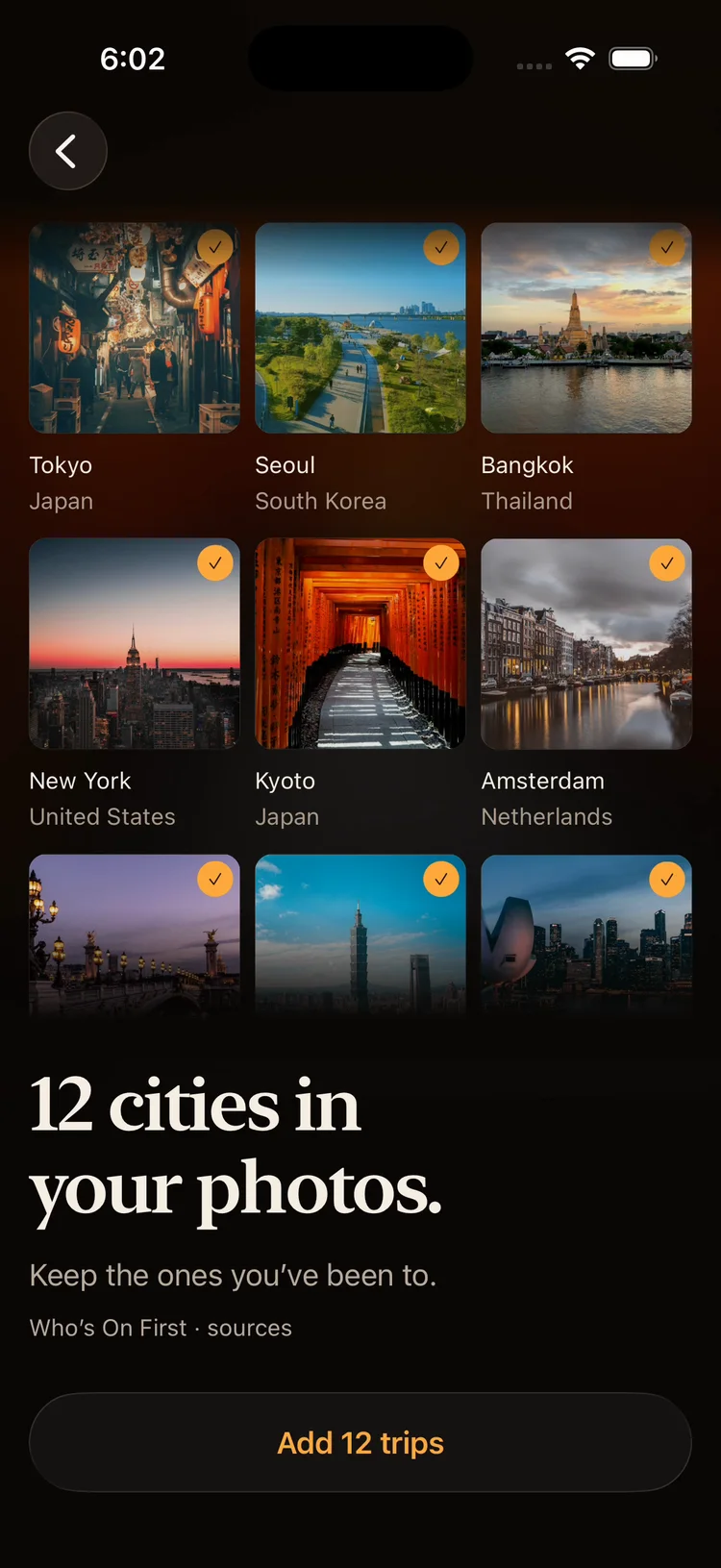
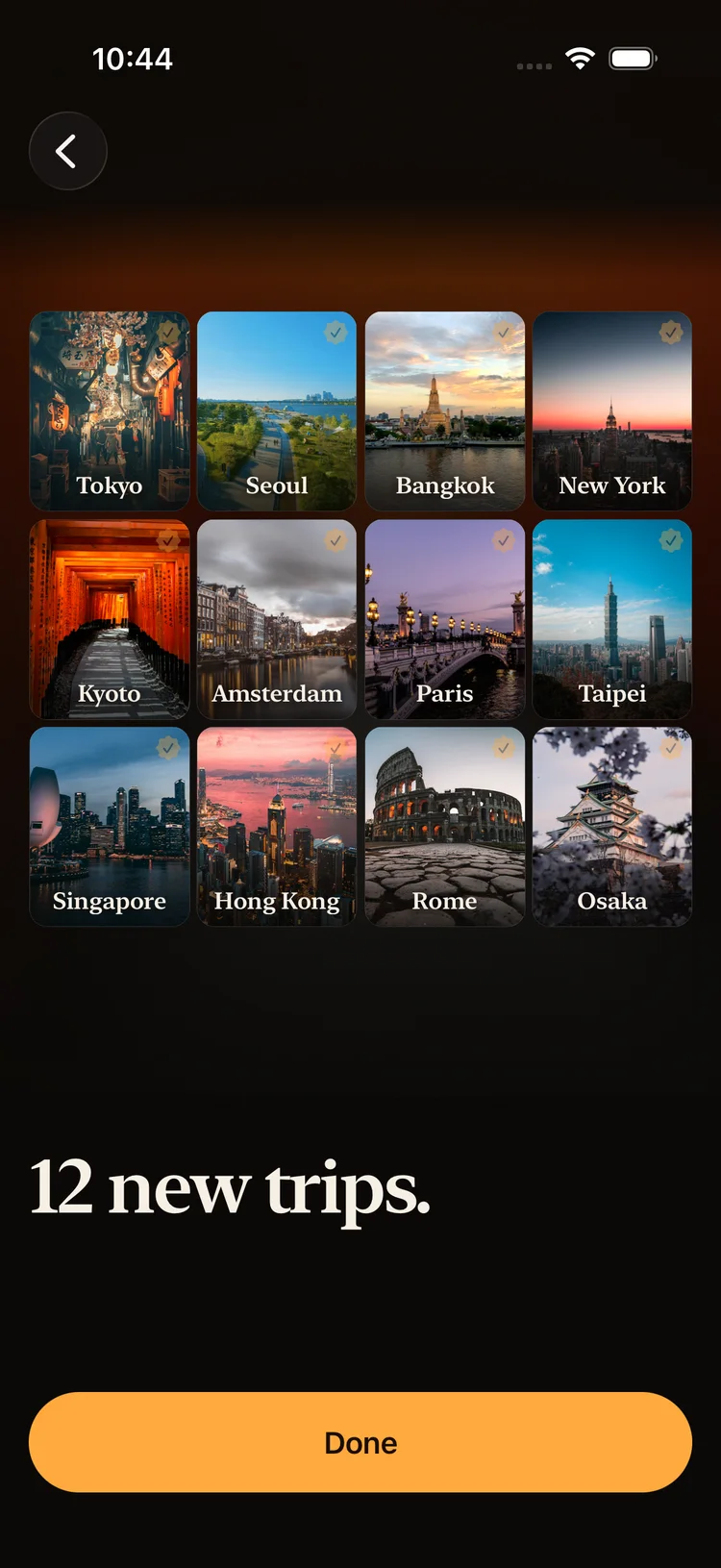
Found in your photos.
Choose Find cities through photos. Crestora reads the locations saved with the photos you allow, and suggests the cities you’ve been to. Keep the ones you want, or add a city yourself.
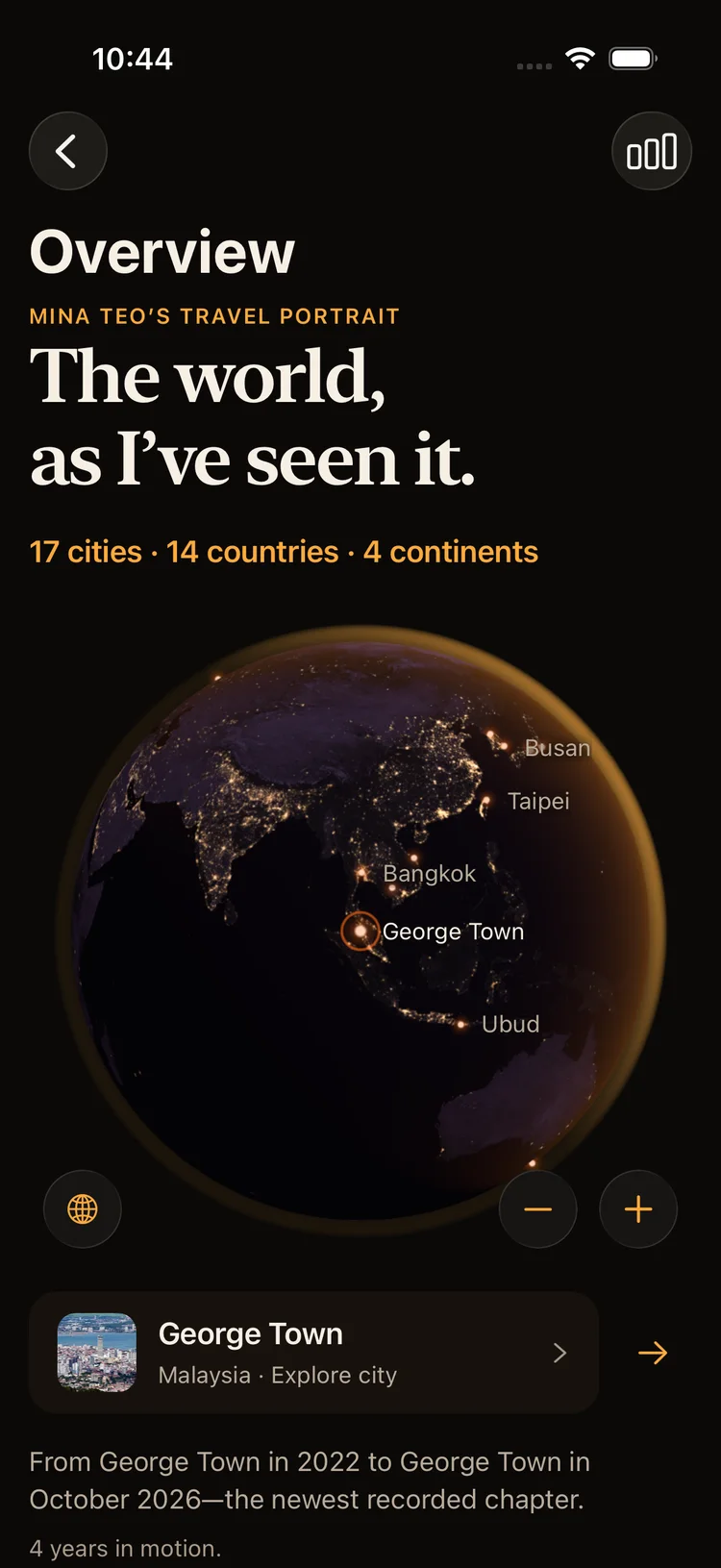
Every city, on one globe.
Your travels light up on a night globe, with your cities, countries and continents counted. Seventeen cities and fourteen countries in this example. Yours will look different.
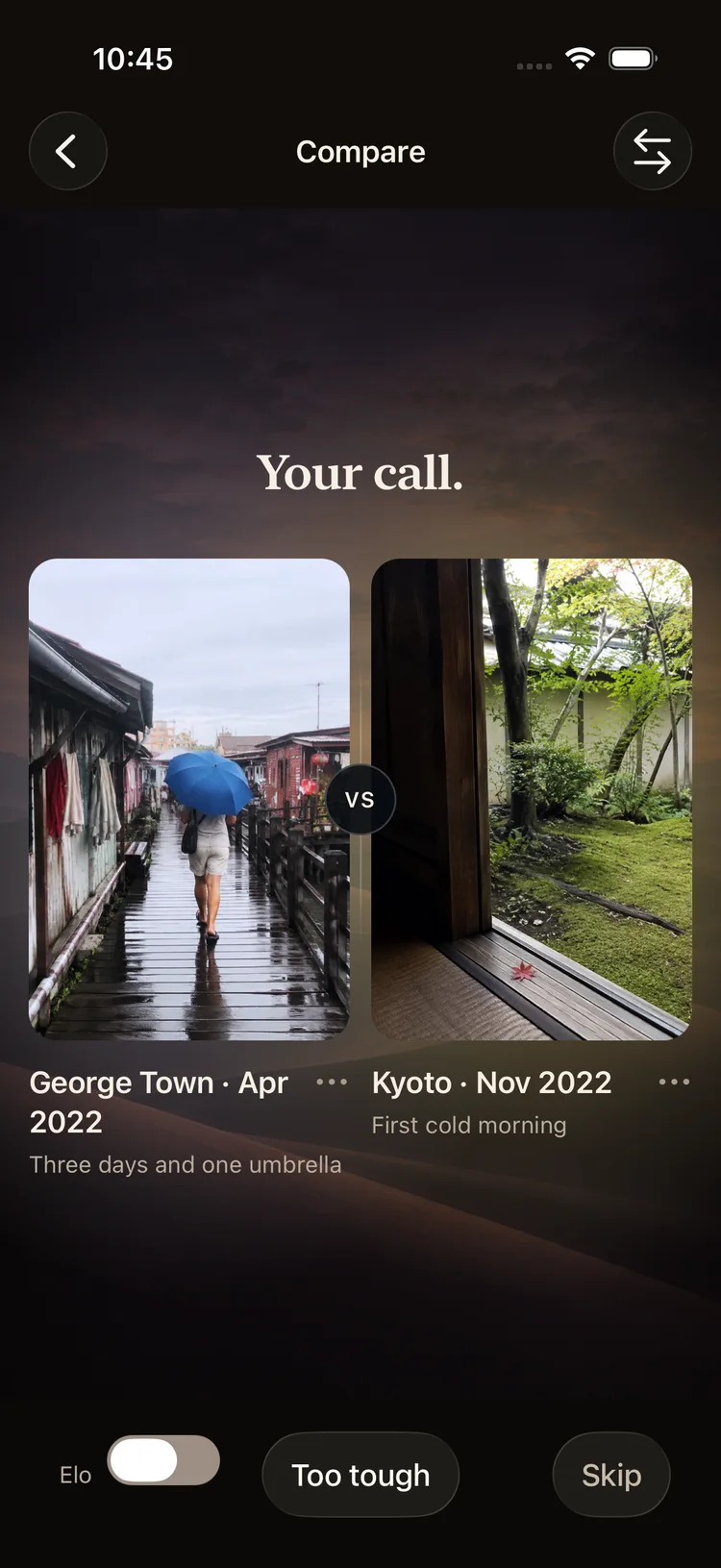
Best trip ever? Your call.
Two trips at a time, one tap each. Your choices build a top ten with a podium, and every trip finds its tier.
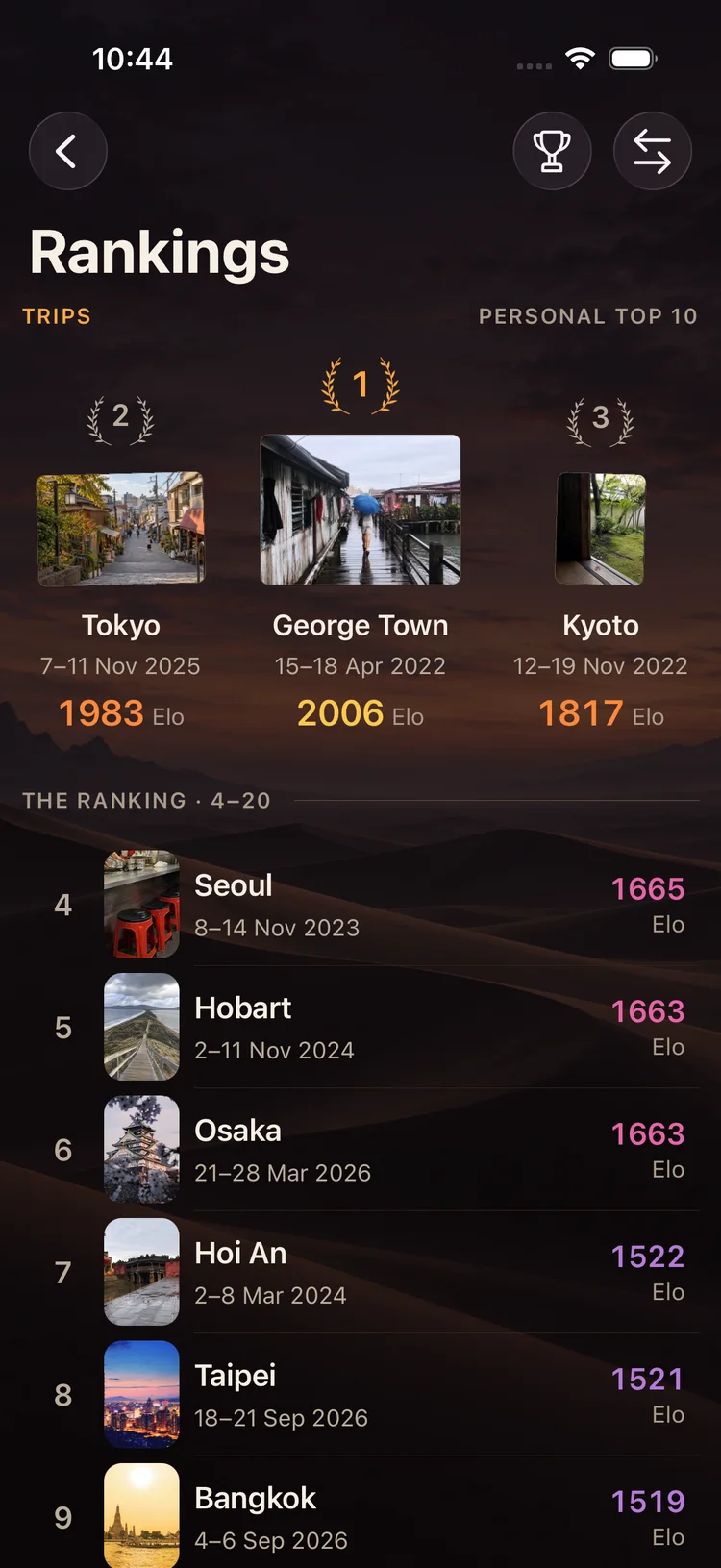
Your top ten trips.
The trip you still talk about sits at the top. Come home from a new one, make a few calls, and see where it lands.
- SSUnforgettable
- SExtraordinary
- A+Outstanding
- AExcellent
- BStrong
- CSolid
- DUneven
- EWeak
- FNot for me
Crestora’s nine trip tiers, top to bottom. Rank your travels
From Unforgettable to Not for me.
Some trips change you and some were mostly airports. Picking between two at a time sorts them honestly: every trip gets a score, your best ten form a podium, and the rest fall into tiers.
Privacy
The scan reads locations, not pictures.
To suggest cities, Crestora reads the location details saved with photos you choose to share. The city scan doesn’t upload the image files.
Read the privacy policyGaps happen
Add the trips your camera missed.
Photos without a saved location can’t suggest a city. Add those places by hand so your map tells the whole story.
How to map places from your photos
Made for
Travellers, all kinds.

01 · The food tripWhere was that noodle place? Your photos remember the city, even when you don’t. Crestora brings the whole trip back into view.
02 · The big oneStill your best trip ever? Put it up against the others, one pair at a time, and find out if it holds the top spot.

03 · The weekenderAll those short breaks count. City breaks add up. See them all on one globe and count the countries you’ve really been to.
Travel guides
Questions travellers ask us.
Free, practical guides for keeping a record of the places you’ve been.
- Trips · Guide
How to map places you’ve visited from your photos
Use saved photo locations to start a travel map, check missing cities, and keep the small details that bring a trip back.Read the guide - Ranking · Guide
What is pairwise ranking? Why choosing between two beats star ratings
How “this or that” choices become an order, how Elo-style scores move, and where comparison-based ranking falls short.Read the guide


Questions
Travel maps, answered.
How does Crestora find the places I’ve been?
Choose Find cities through photos in the app and allow the photo access you’re comfortable with. Crestora reads the location and time saved with those photos to suggest the cities you visited. You review the list and keep the ones you want.
Are my photos uploaded?
The city scan doesn’t upload your image files; it reads the location details saved with photos you give it access to. Other photo features have their own handling, described in our privacy policy.
Why is a trip missing?
Crestora can only suggest a city if photos from there have a saved location. Older photos, cameras without location, or limited photo access can leave gaps. You can always add a city yourself.
Can I rank my trips?
Yes. Crestora shows you two trips at a time and asks which you’d pick, and your choices build a top ten with a podium for your best three. Every ranked trip also falls into a tier, from Unforgettable down to Not for me.
Is Crestora free?
Yes. Crestora is free to download on the App Store for iPhone.



Your turn
Every trip, in one place.
Free on iPhone.
 Or scan with your iPhone camera